
Sign in to your new Engage account by going to https://engage.suran.com/churchofthenativity/s/login and enter your username and password.

Select “Giving” and then “New Gift”.
Select a Giving Fund Set. There are currently two:
- Operating Funds
- Selected Funds that are Available for Donations
In this example we select the Operating Funds.
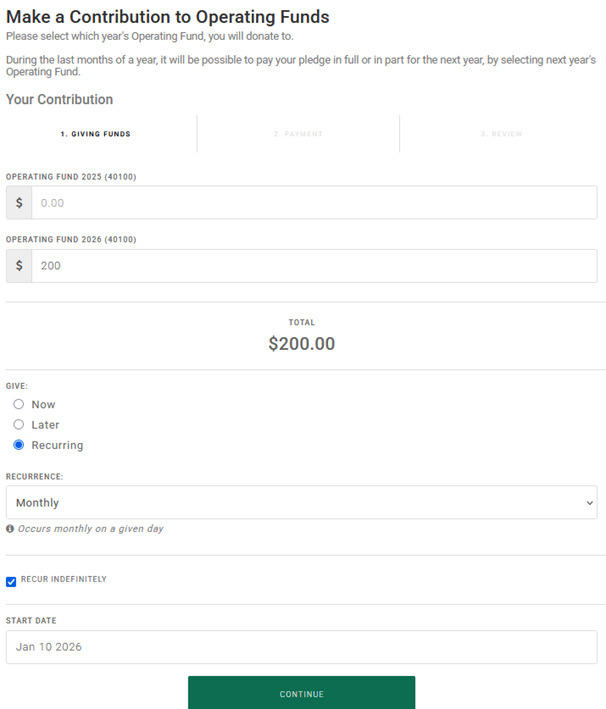
There are two Operating Funds for the time being. The 2025 fund will be removed a little into 2026.
In this example we have chosen to contribute $200 to the 2026 Operating Fund.
To make it a recurring contribution, select “Recurring”.
You will then select how often (in this case monthly) and when to start (in this case January 10).
Keep in mind that it normally will take 2 to 4 days for the contribution to be deposited into Nativity’s bank account, so try to avoid a date that is late in the month.
$200 will be contributed to Nativity every month until you stop it.

You can always see your recurring gifts under “Giving” and “Scheduled Gifts”
From this panel, you change the recurring gift or cancel any upcoming scheduled gifts.